Website updates explained: Plugins, Themes, WordPress Core and PHP

Website updates explained: Plugins, Themes, WordPress Core and PHP

As your Web Designers, chances are: we are also your Web Hosts. The World Wide Web is a constantly evolving entity; and as such, needs regular upkeep. This is partly to ensure compatibility with technological advances, but also in reaction to increases in threats to security. Outlined below are the four main areas we update for clients.

WordPress Themes

WordPress websites are built on a Theme and contain numerous add-ons known as Plugins. Unless specified, annual Web Hosting costs do not include Theme updates.

All WordPress Themes need updates from time to time. These updates are to keep the website inline with updates to Browsers (Chrome / Firefox etc) and various other things which change / improve across the web, and ensure the smooth running of the website.

The top WordPress Themes are updated on a regular basis. When the Theme’s original Author releases an update, they are typically:

  • (Code) Updates
  • Code/ visual Improvements
  • Bug-Fixes
  • Additions / extra features
  • Plugins – Security and stability.

We don’t normally bore clients with each individual update, but your Change-log is always available, if you wanted to see which bits were getting updated. During the first few months of a Website Design: we tend to swallow these costs as part of the website build and quote.

After the build, there will be minimal costs for these updates.

WordPress Plugins

As an open-source environment, WordPress is constantly evolving. Due to it’s popularity, any extra features (such as contact forms and image sliders) a Website might need, can be fulfilled using Plugins. Some of the most popular ones are used by millions of websites across the globe.

Much like Themes, Plugins regularly need updating. Normally, these are improvements and bug-fixes, but Plugins which aren’t updated are a security risk, and one of the most common routes in which hackers can attack a website.

Plugin updates will incur minimal costs, which we will try to keep as low as possible.

From time to time: a Plugin may become corrupt, we reserve the right to charge a minimum fee to rectify Plugins on these occasions.

Clients can request to update their own Plugins; but this must be kept up, as we cannot be held responsible if a website experiences issues due to a lack of clients’ upkeep.

WordPress Core

WordPress itself also needs updating. These are the core files which make up the back-end of your website. In other words: the Dashboard itself – which you log in to, to update your site. This includes improvements and new features such as the Guttenberg page editor, but also security related updates.

Most of the time, we can swallow the costs of costs of the many minor WordPress core updates; major core updates will incur minimal charges however.

PHP version

PHP is the scripting language in which WordPress websites are written in. Around 80% of websites which use a server-side programming language are written in PHP. The most common reasons for PHP updates are:

  • Performance
  • Security
  • Speed
  • Support

Every PHP update means a faster and more secure website. Advances in technology mean faster loading times (for websites that keep up with PHP version updates) …resulting is higher Search Engine rankings, which in turn results in more customers, happier customers, and more profit.

According to wordpress.org:

There are two main benefits to keeping PHP up-to-date:

Your website will be faster as the latest version of PHP is more efficient. Updating to the latest supported version (currently 7.3) can deliver a huge performance increase; up to 3 or 4x faster for older versions.

Your website will be more secure. PHP, like WordPress, is maintained by its community. Because PHP is so popular, it is a target for hackers – but the latest version will have the latest security features. Older versions of PHP do not have this, so updating is essential to keep your WordPress site secure.

And then there are a number of secondary benefits:

A faster WordPress website will be rewarded by search engines, so you’ll rank higher in search! A faster website will retain visitors better (they’ll leave if it takes too long to load), making your website more effective.

A more secure website is better protected against hackers, and the cost and reputational damage associated with a hacked website.

PHP updates incur minimal charges. You won’t be charged if we have to change your PHP version back, due to a conflict.


If a website contains a bug / error, chances are that it requires at least one of the above updates. Any specific (software) bugs not fixed and logged on a Theme’s Change-log can be sent as a request, so this can be included and debugged in the next update’s fixes and improvements.

Speak to us if you’d like to pay an ‘all-inclusive‘ yearly / monthly rate for the updates outlined above. The figure will reflect your particular website, but will be a saving overall – due to less admin and fewer invoices.

Clients retain the right to opt-out of any of the above updates, but we strongly advise against it, as this may jeopardise the quality, compatibility and stability of your website, and your brand and company’s reputation.

‘Gutenberg WordPress Editor’ is becoming the default page builder

‘Gutenberg WordPress Editor’ is becoming the default page builder

If you’re reading this, it means you are like 92% of our clients: Your website is built using WordPress.

In the coming weeks, WordPress’ core version will be updated to 5.0

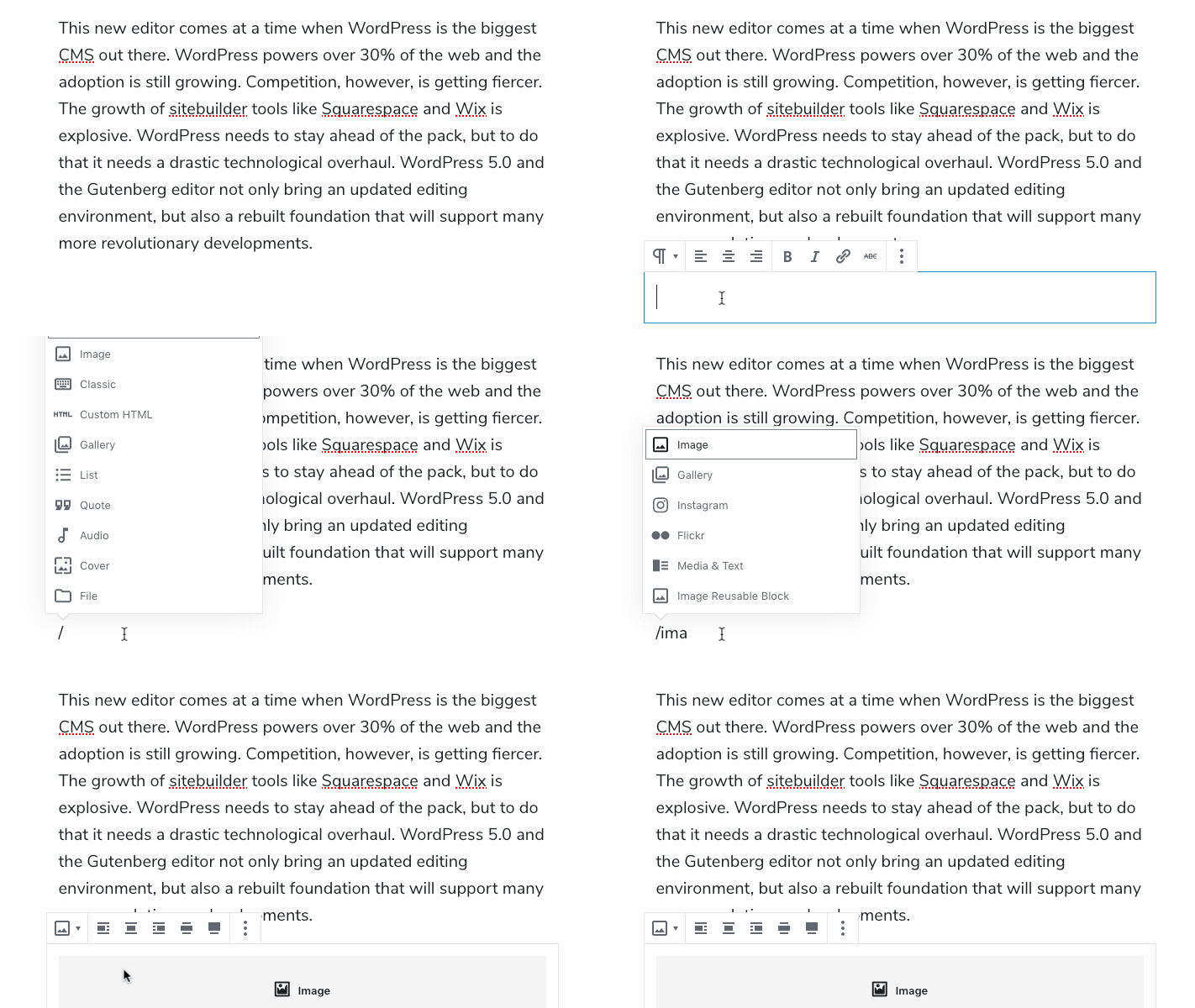
The main part of this update will be that Gutenberg WordPress Editor will replace the classic WordPress editor. Designed to integrate with WordPress core itself, this will be a major change in the way you edit posts and pages.

Gutenberg encourages you to customise your content using ‘Blocks’

Some of the most common blocks available are:

  • Audio
  • Gallery
  • Heading
  • Image
  • List
  • Paragraph
  • Quote
  • Video

Embedding content will also become easier, with options for (but not limited to)

  • Facebook
  • Instagram
  • Reddit
  • SoundCloud
  • Spotify
  • Twitter
  • TED
  • Vimeo
  • YouTube

Here at Classic Lines, we envisage some of the ways in which people will benefit from this update to be:

  • Undo / Redo functions – These weren’t possible before, meaning people used to rely on ‘Revisions’ or (attempt to) go ‘Back in their browser.
  • A more accurate preview whilst editing – The back-end of a Post / Page will look a lot more like the Preview / Live link.
  • The ability to save and reuse blocks – Potentially saving you a lot of time.
  • Faster website: Better SEO – Gutenberg produces nice, clean HTML code compared to other site builders.

What’s more: Some of your favourite (and most-used) blocks can be accessed with time-saving shortcuts – as explained in this demonstration by Yoast:

Download this handy guide from the good people at iThemes Security, for more information about WordPress 5.0 and the Gutenberg WordPress Editor.

Contact Arran if you need some assistance with the latest Gutenberg update from WordPress. If you prefer not to use the new Gutenberg Editor at all, we can help you install the WordPress Classic Editor as a separate plugin.

Although it’s worth nothing:

The Classic Editor plugin will only receive support until 31st December 2021; so it’s worth getting to know Gutenberg as soon as possible.

Ecosia – The Search Engine donating 80% of its income to non-profits.

Ecosia – The Search Engine donating 80% of its income to non-profits.

Make sure your Social Media graphics give the best reflection of your brand

Make sure your Social Media graphics give the best reflection of your brand

So your business has invested in some nicely-branded vehicle graphics for your fleet, polo shirts for the workforce, and a flashing sign for the office…

Hopefully all this branding carries a consistent message and shows your company in its best light. One mistake businesses often make, is not carrying these high standards through their Social Media profiles.

Whether you use:

  • Facebook
  • Instagram
  • LinkedIn
  • Twitter
  • YouTube

…or any combination of the above:

Make sure you are not using low-resolution, out of proportion images for your social media profiles. This includes your profile images and cover photos. It’s also worth noting that Social Networks constantly update their guidelines; so what may have looked crisp and shiny last year, may look squashed and pixelated now.

Not only should your logo be in line with your brand, but your typography, colour palette, even the written (and visual) language of your posts should be consistent. Check out these fantastic Twitter header examples for inspiration.

Take a look at the Twitter graphics we designed for Business Partnership; or speak to Classic Lines Design about designing your Social Media graphics.

‘Official’ GDPR figures – Deadline: 25th May 2018

‘Official’ GDPR figures – Deadline: 25th May 2018

Are you ready for the GDPR compliance deadline on the 25th of May 2018?

If not, speak to us today to see if we can help. While you’re there, check out our interesting Privacy Policy 😉

Let’s stay together

You may have also received an email from us asking you to Confirm Subscription to our newsletters.

the law is changing

…and we want to keep you in control of how we stay in touch.

You may have heard about GDPR, which comes into effect 25th May 2018. To help comply with GDPR consent requirements, we need you to confirm that you would still like to hear from us. If you do not confirm using the button in the email, we will have to treat this as an ‘opt-out’ from Classic Lines’ records.

Let's stay together - GDPR - Classic Lines Design

Netflix is now using YOUR viewing habits to personalise the graphic design it shows you

Netflix is now using YOUR viewing habits to personalise the graphic design it shows you

You’ve heard of ‘feedback loops’ and ‘echo chambers.’

These are situations where Facebook / Google hold so much of your data and know so much about you, that they know exactly what adverts and messages to target you with. So the more your interact (like / share) with a certain product, brand or organisation, the more information relating to these you’ll see in your feeds.

These clever algorithms are often used in elections, and to promote political propaganda. Which it has been said, has made people more extreme (or at least more stubborn) in their views. …Most notably in yesterday’s Cambridge Analytica revelations.

But for the responsible marketeer, there are less underhand advantages of this habit-tracking technology.

Netflix, for example; has started using their customers’ past viewing habits to target them with specific the graphic design and cover art.

Like all streaming services, Netflix keeps records of what you watch (and how you watch it) and will now cleverly adapt the graphic design of its suggestions to display similar films and shows.

As a simple example: If you have recently watched Grease, Netflix will generate a Pulp Fiction poster featuring John Travolta. Whereas if you have been watching Kill Bill, you’ll be targeted with Pulp Fiction’s artwork featuring Uma Thurman.

It’s one big step beyond “Recommended for you” or “Customers also brought..”

So what’s the lesson here?

Whether you’re blogging, posting a social media update, speaking at an event, or sending out en email campaign: You should always target your audience specifically.

Contact Classic Lines Design to see how we can customise your brand‘s message. This may be through personalising marketing literature, or filtering your Social Media posts to target only users with certain interests and preferences.

Do I need an SSL Certificate for my website?

Do I need an SSL Certificate for my website?

You may have noticed a green padlock symbol (or a warning about the lack of!) in some websites’ address bars…

Websites with the secure, green padlock symbol have been marked by your browser as ‘secure‘ because they contain an SSL certificate.

What is an SSL Certificate, and why do I need one?

  • Our SSL Certificates provide secure https:// browsing,
  • Browser padlock: Visitors will see the universally-recognised padlock in their browser bar, showing that they are viewing a site over a secure connection,
  • Rank higher in Google: Google favours secure sites, so installing an SSL can help improve your rankings, helping potential customers to discover your site,
  • Browser warnings: Web browsers, especially Google Chrome, let users know when a site isn’t secure. An SSL takes care of that, ensuring your website avoids browser warnings,
  • eCommerce: SSL is a must for eCommerce websites. If you’re taking payments on your website, SSL is non-negotiable.
  • The certificates utilise SHA-2 256-bit encryption and 2048-bit signing algorithm – the same type used by businesses and governments around the world to keep their data protected,
  • SHA-2 and 2048-bit encryption.

It’s important to protect your brand:

  • Protect your customers,
  • Protect your company,
  • Protect your rankings.

Secure private information: An SSL certificate shows that you care about the safety of your customers. So new visitors will be comfortable to buy from you,

Boost conversion rates: By displaying a padlock in the browser window, you show visitors that you are a company that can be trusted,

Boost trust: We will install and configure your certificate, quickly and efficiently.

What’s more:

Google have announced that as of October 2017: Google Chrome will start marking HTTP pages (which contain forms) as “NOT SECURE.” In July 2018, Google will release version 68 of Chrome, that will mark every HTTP website as “NOT SECURE.”

For more information, take a look at what Wikipedia has to say, or download our SSL Certificates PDF.

Email Arran to discuss the SSL Certificate for your website.

Have you considered VPS / Dedicated Server Hosting?

Have you considered VPS / Dedicated Server Hosting?

The majority of our clients are on a shared hosting platform. This is where multiple websites are all hosted on the same Web Server. This is the most economical option for most non-corporations, as the overall cost is spread over many customers.

However, we do offer the option of Virtual Private Servers.

VPS give our clients:

  • Dedicated resources for superior performance: Our hosts build their Dedicated Servers on the very latest hardware; to ensure that you get the best possible performance and maximum reliability,
  • 99.99% uptime SLA: We’re so confident you’ll always be online: that we’ll provide you with compensation if you experience more than 0.01% downtime per month,
  • Superfast & reliable: Our host’s servers have a direct internet connection to major European exchanges > Ensuring a rapid and stable performance.

VPS

Our Hosting Provider is responsible for:

Server hardware, Power and network availability, Manual reboot availability and Control Panel license availability.

So all we need to worry about is:

All server software and performance, Configuring hosting and email settings, and securing your server. Also: Network configuration and Installation, third-party modules and plug-ins.

Server specification

  • Intel Xeon E5-2420 x 2
  • Up to128GB RAM
  • Hardware of up to 4 x 1TB SATA RAID 1
  • Up to 1 Gbit/s Bandwidth.

Contact Classic Lines Design to see if your website requires VPS.